EARLY ACCESS · FOR TALKING-HEAD CREATORS & FOUNDER-LED VIDEO

Stop editing. Start directing.

Prompt the cut. Watch the agent reason. Approve the timeline. Editing collapses from hours to minutes — every decision stays yours.

NO CC · ROLLING ACCESS · NO SPAM
Or watch the agent reason first
getlumiere.app/editor
Interview_Final
Saved
Podcast frame
HOOK · 0:00–0:03
1080p · 9:16
00:04.13 / 00:36.53
00:00
T1 trans
V2 b-roll
V1 main
A1 dialog
IDLE
CLICK A PROMPT TO RUN A LIVE EDIT
Scanned library for cinematic motion
Matched 4 candidates to emphasis beats
Placed clips on V2
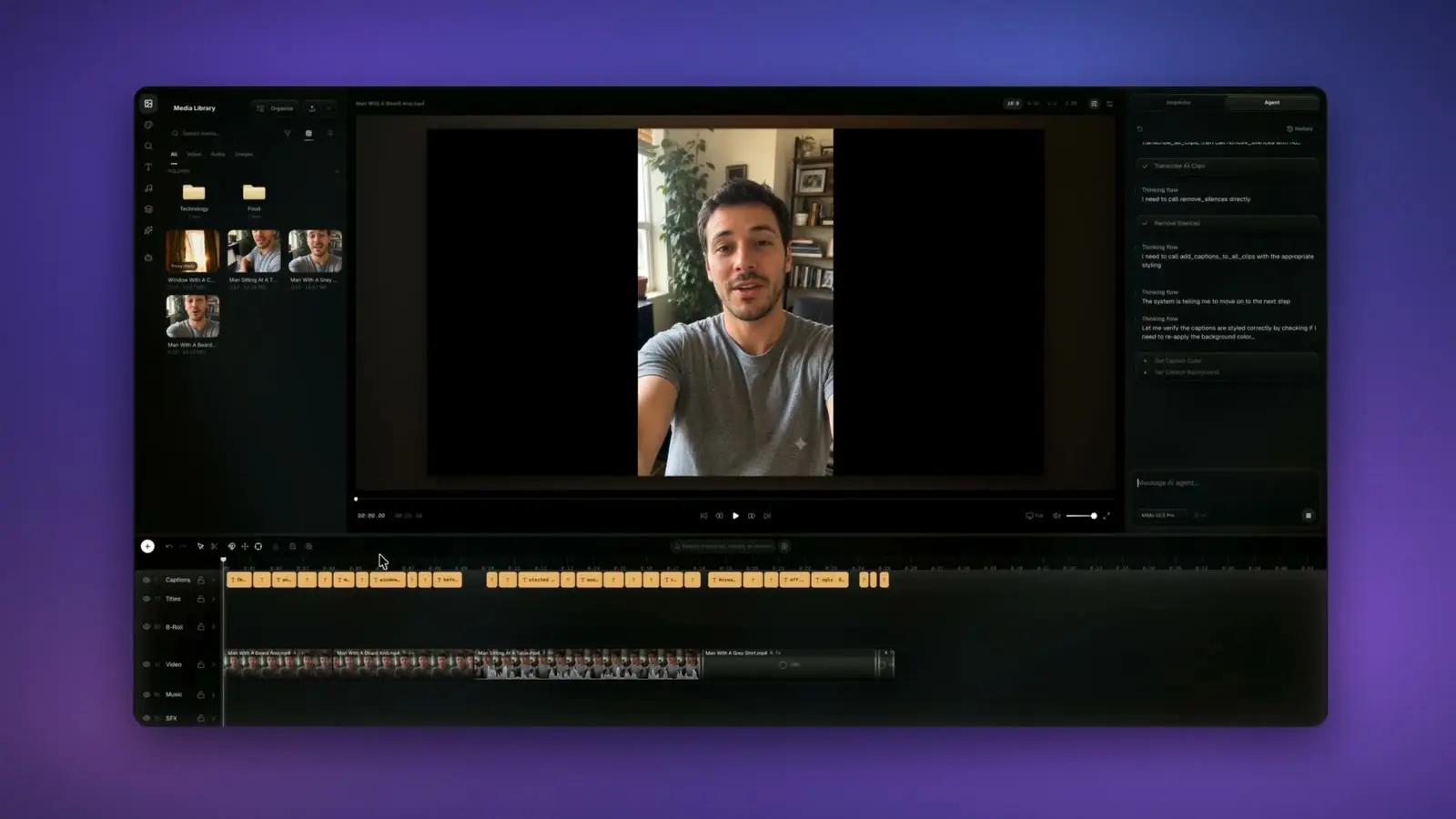
— 01 / AGENT REASONING

Watch the plan before
the cut lands.

Every prompt produces a visible thought trace, tool list, and timeline diff. Bad assumptions die in the chat, not on your timeline.

RAW
IMG_0421.MOV
DJI_0033.MOV
Clip_final_v2.mov
TAGGED
interview-A-establishing.mov
b-roll-cityscape-dusk.mov
cutaway-hands-closeup.mov
— 02 / LIBRARIAN

Your footage, organized
before you ask.

Lumiere watches every clip and reads every transcript. Files get renamed, tagged, and grouped by scene, speaker, and emphasis — so the agent finds the right shot in milliseconds.

DROP FOOTAGE
— 03 / BROWSER-NATIVE

No install. No render farm.
Just the editor.

Built directly on WebCodecs. Open a tab, drop footage, work like it's a desktop NLE — and ship straight from the browser.

The finishing work, done for you.

Captions, pacing, b-roll, motion graphics, color — the parts that usually eat your evening, handled in one browser tab and steered by a single prompt.

Mostpeopleneverfinishtheedit.
CAPTIONS

Captions that hit on the beat.

Auto-transcribed and word-synced, with karaoke highlight, clean wrapping, and brand styling — every line landing exactly when it's spoken.

−2.4s
PACING

Pacing, tightened automatically.

Lumiere pulls the slack between words so the cut never drags.

“animated lower-third”
Ava Mercer Founder, Lumiere
MOTION GRAPHICS

Motion graphics from a prompt.

Describe it — titles, lower-thirds, and callouts render live on the canvas, animated and on-brand.

“…the city never sleeps”
B-ROLL

B-roll matched to the moment.

The agent reads the transcript, watches your clips, and lays the right shot over the right line.

CINEMATICWARMMOODY
COLOR

A cinematic grade, decided for you.

Log-aware color and real 3D LUTs, matched shot to shot so the whole video feels intentional.

EXPORT

Render in the tab. Ship everywhere.

WebCodecs renders locally — no upload, no render farm, no desktop install. Reframe once, export every aspect ratio.

4K·60FPS·MP4 / H.264·BITRATE CONTROL
RENDERING · 100%
9:16
1:1
16:9

Your timeline. Your taste.

AI handles the rest.

TRADITIONAL NLE
  1. Open Premiere
  2. Import footage
  3. Watch every minute
  4. Mark cuts manually
  5. Drag in B-rolls
  6. Add transitions
  7. Color & caption
  8. Render & export
~3 hours
VS
LUMIERE
  1. Prompt
  2. Approve plan
  3. Direct
~12 minutes

Every edit is visible.

Every decision is yours.

Four moves. One taste.

  1. 01

    You prompt.

    One plain line of intent — read like an assistant editor would read it.

  2. 02

    Agent reasons.

    The plan appears in chat before the timeline moves. Steer or veto.

  3. 03

    It writes.

    Decisions land as real clips, real cuts, real captions — nothing locked.

  4. 04

    You direct.

    Judgment stays where it belongs. The agent does the mechanical work.

Designed for creators who focus

on the vision, not the friction.

Pick your tier.

Private beta starts with capped free access. Pro and Max add monthly AI credits for heavier edits, transcription, and deeper analysis.

FREE
PRIVATE BETA LIMITS
$0

For testing the editor with daily AI limits and full timeline fundamentals.

MONTHLY CREDIT BUDGET 0 included credits
No rollover · cloud AI stays capped by beta limits.
  • 10 AI chat requests / day
  • 5 motion generations / day
  • 60 transcription minutes / month
  • Timeline editing, captions, transitions, and stock search
Join Waitlist
PRO
SOLO CREATOR BUDGET
$17/mo

For regular AI edits, captions, and assisted finishing with fewer beta limits.

MONTHLY CREDIT BUDGET 1,500 AI credits
Rolls over up to 4,500 included credits.
  • 1,500 AI credits / month
  • 1,500 transcription minutes / month
  • Priority queue + longer context
  • Advanced multi-step edits
Request Access
MAX
STUDIO HEADROOM
$42/mo

For heavier motion, deeper analysis, and larger multi-step edit sessions.

MONTHLY CREDIT BUDGET 4,000 AI credits
Rolls over up to 12,000 included credits.
  • 4,000 AI credits / month
  • 5,000 transcription minutes / month
  • 2x Deep Analysis frame sampling
  • Priority queue for larger edit sessions
Talk to Lumiere

Questions before you start. Answers before you ask.

What formats and codecs does Lumiere support?

Import: H.264 (MP4/MOV) and VP9/AV1 (WebM), up to 4K, 60fps — plus H.265 where your browser supports it. Audio: WAV, AAC, MP3. Export: MP4 (H.264; H.265 where supported), with bitrate control.

Can I export to Premiere or Final Cut?

Yes. XML (FCPXML) and EDL export are in beta for Pro and Max tiers. Full timeline reconstruction in your desktop NLE.

Do you train on my footage?

No. Your media stays in your own private cloud storage bucket, and nothing you upload is ever used to train any model. The agent only reads your project to make the edits you ask for — never shared, never sold.

Does it work offline?

The editor runs in your browser, but both your media and the AI agent need a connection — the agent reasons in the cloud and your footage streams from your private storage. Your project autosaves continuously, so a dropped connection won't lose your edits.

Trade editing time for output.

Editors using Lumiere ship a finished talking-head video in 12 minutes instead of 3 hours.

NO CC · ROLLING ACCESS · NO SPAM